Sunday, 3 August 2014

Blogging in Education


What is Blogging? Why use it in Education? How do we do it?

These are the questions I asked when myself and a colleague were looking at using 'Blogs' at our school.  Especially......Why use it?.  I hope this post may help you start this blogger journey or get a better feel for Blogging in Education.


What is Blogging?

Before this the question we need to ask is "What is a BLOG?".The word comes from the expression 'WEB LOG' and is a discussion or information entered as 'Posts'; this is published on the World Wide Web.

When you work on a blog and using all the skills when editing a blog you are BLOGGING. Blogs can be personal or corporate and organisational and come in many media forms: for example written, photos, sketches etc.

Most of us in education use a CMS (Content Management System) to help use create, edit, manage and publish our blogs on the World Web. If we didn't use a CMS we would have to deal with coding every page....and as educators we have no time to deal with that.

Below is a good link that looks at some of the best CMS for creating a Blog.

Word Press is the most popular and has plenty of add ons and extras that make for some very high level presentations.

I have found in NZ Schools, due to many using Google and Google management systems like 'Teacher Dashboard', use Blogger. It is hosted and is very easy to use, perfect for schools.


No 1.  

No 2.  

No 3.  


LMS (Learning Management Systems) also provide the chance for students to 'Blog' as well.

Why use it in Education?

Blogger utilises many skills and is a very 21st Century resource to learning. Students need to learn the skills of blogging, the technical skills, communication skills and visual presentation skills.

Then it's Blogging for a reason that supports the learning experience happening in the class.

Before starting we did a lot of work and had plenty of discussion around 'What is Blogging, and being a digital citizen when contributing and being part of a huge community of online contributions.

There are also age recommendations. Wordpress says 13 years of age. To have a Google account you must be 13, that is why schools with Year 8 students and under really need a school domain. Recommendations for Google+ and Blogger is 13+ I am lead to believe. 

Why we implemented Blogging:

Our pedagogy was driven by a lot of Guy Claxton's work (which I have talked about in other posts) and one of the fundamental traits students should exercise to build learning power is REFLECTION. 

Reflection - covers the aspects of learning that are to do with strategic management and self-awareness. They include planning, self-evaluating (revising), looking for further application (distilling) and fluency in the languages of learning (meta learning).

Therefore, we were going to use Blogs as a way for students to reflect on their learning.

How do (did) we do it?

This needs to be answered with two separate questions:

1. How do we implement it into our class program?

2. How do we do implement it Technically into our class?

Implementing Blogs in our class program was just one part of our whole google vision or plan. it was one piece of the jigsaw. We spent plenty of time with both teachers and students working on Google Drive applications before we started with Blogs.


 The process or long term plan of getting our students effectively blogging.
  1. We ran what we called a 'Discovery Week' where we had a context and students could personalise their learning around this. Communication was the key word specially looking at different types of media, messages, beliefs, opinions and how they are conveyed. Great place for them to start understanding the power of the word and the many ways available to us to have our voice, thoughts and interests heard.
  2. We then introduced what Blogs are and what is 'Blogging, and how personnel blogs were a great way to write reflections (we had discussed already on what 'Reflection' looks, feels and sounds like earlier in the year). We brainstormed why Blogs are such an exciting and useful tool to use for reflecting on ones learning:
    • Add photos
    • Add Links
    • Video reflections
    • Diagrams
    • Graphs
    • Websites
    • Youtube etc etc
    • Sharing/feedback
  3. We had Friday rotations over the Term. One of the rotations looked at the technical skills of setting up and personalising a blog (front loading).
  4. Before long the students were away and laughing!
Its also important to note we also got the staff to reflect on their own learning/practice to use for their own Professional learning and Teacher Registration documentation.


Now this was the big one for me ........  How do we do it Technically? I will put this into a separate Post. Have fun and please comment or point readers to other places for information on blogging in education.

Monday, 9 June 2014

The e-Learning Planning Framework (2)

Please see my below post so that you can see where I am at. 

It has been a tricky and challenging process. The information that I wanted to get from the shared document was limited, but at least I gave everyone a chance to look at it.


I also created a Google form for individual staff and Individual Students to answer. I did this by deleting everything except the questions for that specific group then put this in a Google Form.

I presented at a staff meeting and shared the form to all staff. Happy to share this if you are interested.

For the students I did the same thing with a poster to entice them. I let them discuss and do this in groups. I wanted them to challenge and debate certain aspects. Feel free to view the form by following the link.

The next Questions: What did all the feedback say? What am I going to do with it?


To Complete an…..

“e-Learning Framework” Questionnaire

We want you Students To help Whenuapai measure our e-learning capability.

The below website takes you to a page with a link to a questionnaire.  you as a student (or group up to 4) will then identify where you are in regards to your e-learning journey at Whenuapai.


There are a few terms you may not know. In google if you type in your browser:

define: (word you want to know)

It will tell you what that word means and sounds like.

ex whanau - an extended family or community of related families who live together in the same area.

Thank you in advance team for completing this form.

Tuesday, 6 May 2014

The e-Learning Planning Framework


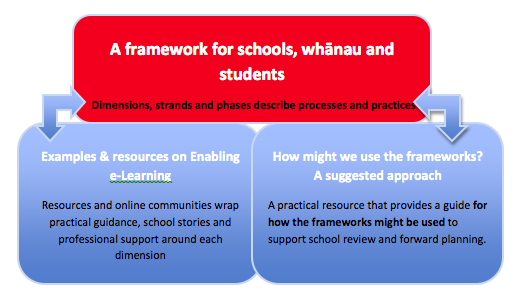
I believe we are at a point where we need to look at where we are at and what is the next steps. You can very quickly get overwhelmed with e-learning and start running around like 'headless chocks' as my Grandad use to say, when it comes to all that e-learning has to offer. The e-learning planning Framework is going to be the answer to help create sanity and direction. This blog entry is how we will proceed with this.

Where to start?

I must mention now that everything used originated at the TKI e-learning website


Here you can find everything you need to create "A ‘road map’ that enables schools/teachers to identify where they are, the practical steps they can take to improve their practice, and connects them to relevant information or services to support them in doing this". 


The videos and resources are endless. Not just the tool but practical ideas for the "Where to now?" question that I can see myself asking when filling in the "Framework for Schools'. I think throughout this whole process I will keep in mind a few statements that I continually say to myself.
  1. We need to take manageable steps. We want everyone on the train but we don't want to shove them in and rush to what we envision as a utopia, in a mad rush...we would not get there!
  2. That the information does not just sit separate to everything else within the school, it needs to filter through all we do.

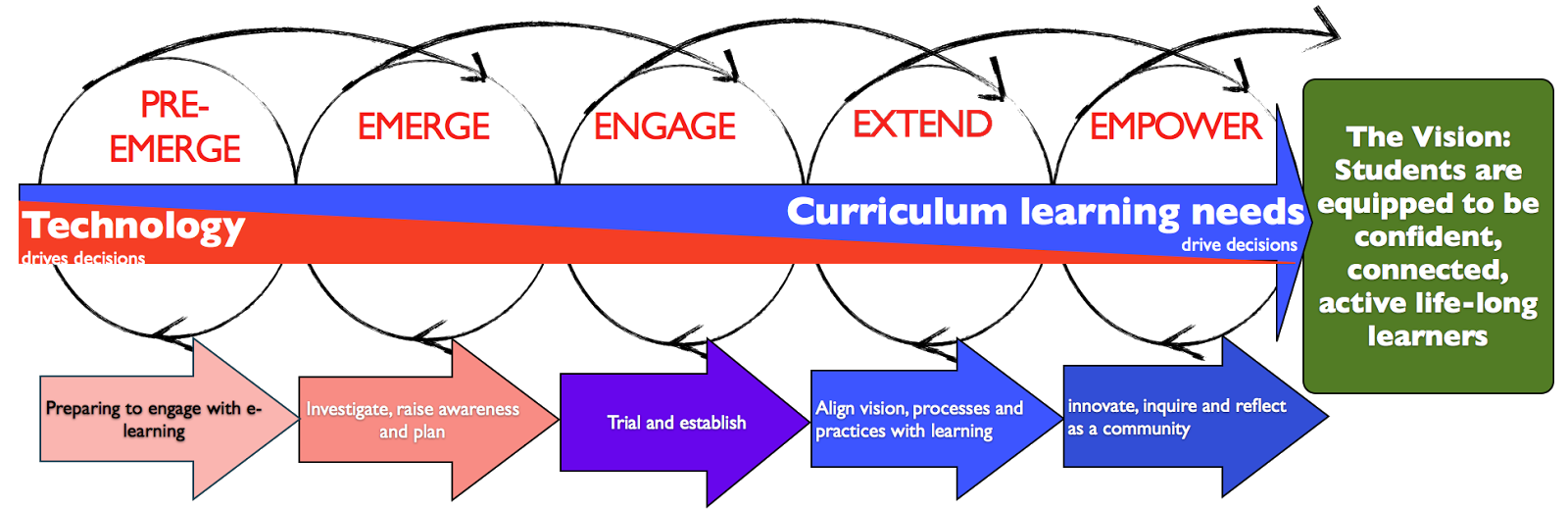
The five phases


Pre-emerging

WHOLE SCHOOL: You need to put in place deliberate actions to plan for or  integrate e-learning across the school.
Emerging
WHOLE SCHOOL: You investigate, raise awareness and plan for growing your ability to use digital technologies for learning.
Engaging

WHOLE SCHOOL: You establish and connect planning across the school; you trial initiatives.
Extending

WHOLE SCHOOL: You effectively align across school, community and wider networks. The use of digital technologies is refined and appropriate to meet all learners’ needs.
Empowering
WHOLE SCHOOL: Your school, community and networks work in partnerships to reflect and plan. Technology use is ubiquitous, virtual, accessible and equitable, enhancing authentic, co-constructed learning within and beyond the school community.

The first collation of information regarding where we are at in our e-learning was looking at our 'school' as a whole


I am going to use Google Apps throughout this process of gathering data and below is my first creation that you are most welcome to use.

I decided to create a discussion document by taking out everything from the original and leaving just the school options. This document becomes a discussion Doc that people can write on, comment on, come back and view at a later date and make changes whenever. I wanted it to be very organic. I invited some key people on the staff but also invited everyone that would be interested.

The key sentence when staff first looked at this doc was "Please indicate where you think we sit from the position you hold within the school.."


e-LPF School Response Doc

Thursday, 1 May 2014

GAFE NZ Summit - North Island

What a great few days I had at the 'Gafe Summit' in the North Island. This summit was all about Google in Education and the magic it provides to us as educators and to our students.


It was a brilliant mix of inspiring thinking, shifting the norm of teaching practice, new technologies and opportunities and motivational talks, chats and presentations.

It was more than flipping the class it was about flipping the teacher.


Okay so this blog could go forever so here is a few GEMS, AhHa moments that I got from the two days.

Very necessary: 
  1. Google Apps in Education
  2. www.synergyse.com - This is PD for staff at the click of a button - MAGIC
  3. http://whatsnew.googleapps.com/update-feed - Google Updates, you must sign up
  4. http://edutraining.googleapps.com/apps-edu-admin/chapter-2 - How to implement Google Apps 
  5. HAPARA - A must for schools if you have a domain in your school
Some interesting resources:
  1. MOOC's - Massive Open Online Courses
  2. http://youtu.be/lZqX6ocwHWU - all about Google Add-ons
  3. SAMR Model - Ted Talk
  4.  Steal Like an Artist - Book by Austin Kleon is a guide to creativity in the digital age
Just Cool Stuff:
  1. WeVideo - Google app for video editing
  2. Backupify - back up all your Google Drives, emails etc
  3. Lucidchart - very cool 'Mind Map'
  4. Easybib - Google Add-on
  5. Table of Contents - Google Add-on
  6. Easy Header and Footer - Google Add-on
  7. Audio Tool - Google App for online music production Studio
  8. Pixton - Google app for cartoon creation
  9. http://www.colourlovers.com - a good site to give colour backgrounds for your Google Sites
Quotes and Sayings that I liked:
  1. "Ensure you implement Google Apps in meaningful ways in your school to increase efficiency, collaboration and engagement"  - Tim Lee
  2. "Is this the real world?" - Youngboy on a YouTube Video
  3. "Students need output when being Creative" - Jim Still
  4. Learning is a social process and Google plays a strong part with collaberation - Rob Clark
So much more but that will do for starters.....

Monday, 14 April 2014

e-learning and the year ahead.

The first Term is near an end and there has been so much we ave achieved in regards to implementing e-learning into the school. These developments I will start to document more regularly.

There are 5 preview points that I want to bring to our attention in preparation to up and coming blog posts. 

  1. The move away from the term ICT when discussing ICT. This term narrows peoples thinking in regards that it is only about getting tools into the class. There is a fundamental change in pedagogical practice due to the opportunities ICT brings and this is what we want the community to focus on when we talk ICT. The term we will now refer to with anything ICT is e-learning and this shift makes it more student centered and about teacher practice. 
  2. What is elearning and it's place in the scheme of things?
  3. Some crystal ball gazing (based on research) in regards to the huge influence this is to have, if not already on class practice, student achievement and how we are tracking. Also, what we endeavor to achieve at our school over the next few years.
  4. Past, current and future developments
  5. Curriculum development of e-learning and it's link in our curriculum strategic plan.
I believe that the term 'e-learning' is going to be a term that is said in the same breath when saying the words literacy and numeracy. There is a whole paradigm shift that is happening out there in our schools. 


So I look forward to bringing you my e-learning journey.

Saturday, 1 February 2014

Welcome to my e-learning journey.

I have been to some rewarding conferences, workshops and school visits in regards to ICT, BYOD, Google, e-learning and the concept or 21st Century Education or Education 2.0. They were rewarding and reassured me that educationist we are on the right road, heading in the right direction.......however no one really can pinpoint the destination only that it will be a transformation in educational practice and that it will be exciting and something we should not fear or hold back from.

Here’s an interesting video from Enabling e-Learning: Leadership, where Dr David Parsons (Associate Professor, Massey University) talks about the term ‘e-learning’ and elaborates on defining this more like, ‘blended learning opportunities’ where e-learning tools are integrated in authentic ways.


 This blog will be a reflection journal me. To start this blog I thought that I needed to think about:
  1. Where we want to be in our teaching pedagogy
  2. What we need to get there
  3. Why we need to 
I will add pages where I feel there is a real need for it to stay at the forefront of our thinking

Where to Start.......

Below is the SAMAR rubric to help teachers reflect on their teaching when implementing I.C.T into their classrooms. We have pushed this out to help staff understand where they sit. Here is a great webpage that backs this up so well - Samr as a framework to move forward.

We however need to dig a little more with this; this can wait till a later post......